On-Call Schedules That Don't Break Your Team
Updated on
Jana Sauer
Nobody wants to be woken up at night because no one set up a proper on-call rotation. Unfortunately, this still happens to plenty of teams - and it leads to resentment, missed incidents, and burnout.
This guide walks you through building an on-call schedule that covers your services without grinding your engineers down.
TL;DR:
A working on-call schedule defines clear ownership for every time window, escalation when the primary doesn't respond, and structured handoffs that preserve context.
For most teams of three or more, weekly rotations with a secondary tier are the right default. But the schedule on paper isn't enough on its own - alert hygiene, runbooks, and a viable team size determine whether it actually works.
What Is an On-Call Schedule?
An on-call schedule determines which team member is responsible for responding to incidents during a given time window. When an alert or incident fires, it goes to exactly one person or a clear escalation chain instead of the entire team.
The goal is to remove the ambiguity that makes incident response slow and chaotic. Clear ownership means faster responses, fewer responsibility discussions at 3 AM, and a team that can actually recover between shifts.
What Are Typical On-Call Rotation Models?
There's no single right model. The one that works depends on team size, time zones, and incident frequency.
Weekly Rotation
The weekly rotation is the simplest and most common setup for small to mid-sized teams. One engineer is responsible for a full week, then hands off to the next person. It's predictable to plan around and easy to manage with most tools.
However, if your alert volume is high, one bad week can feel brutal. A maximum of two to three actionable incidents per 12-hour shift is recommended as a sustainable baseline. If your team consistently exceeds that, a weekly rotation will grind people down regardless of how fair the schedule looks on paper.
Daily Rotation
Daily rotation works well for teams with high alert volumes or frequent incidents. A different engineer is on-call each day. This distributes the load more evenly and prevents any one person from having a nightmare week, but it increases handoffs. A daily rotation between three people would look like this:
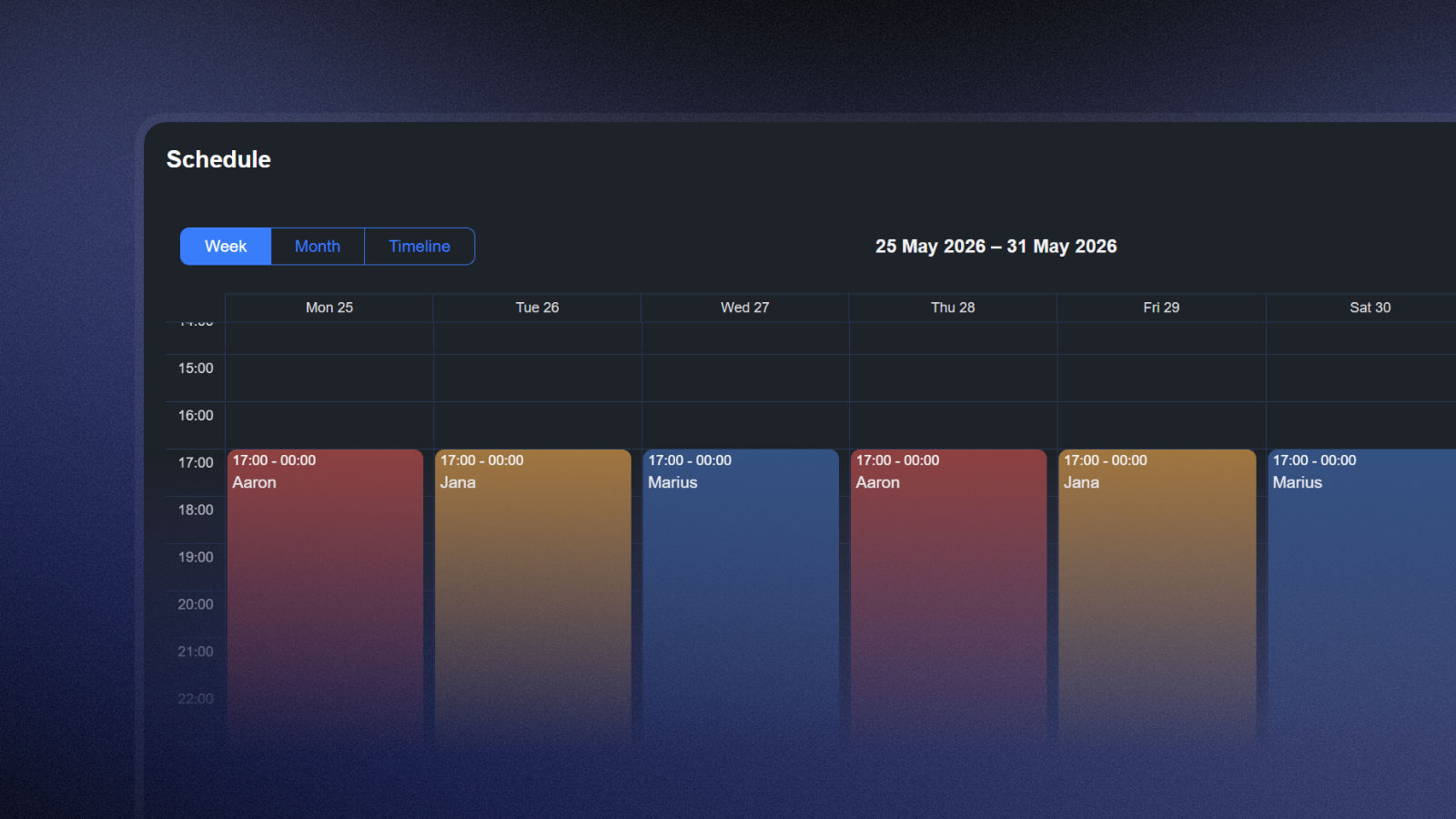
You need strict handoff procedures with a written summary of active issues, any quirks in current alert behavior, and anything from the day that might resurface overnight. The constant context-switching isn't worth it for teams with low incident frequency.
Follow-the-Sun
This strategy is ideal for large teams distributed around the globe. Each regional group covers their normal business hours, so nobody has to be on-call at night.
The catch: you need enough engineers per region to make it sustainable. Three engineers in one timezone cannot maintain follow-the-sun coverage without burning out within weeks. A practical minimum is five to six engineers per region for this model to actually protect sleep.
How to Build an On-Call Schedule
Step 1: Define the services that need to be covered
Before assigning names to time slots, get clear on what you're actually covering:
Which services need 24/7 response?
Which can wait until business hours?
What's your expected time-to-acknowledge for a critical incident?
These answers determine how tight your rotation needs to be and whether you need overnight coverage at all — because not every team does. If your service has zero business-critical activity between midnight and 6 AM, acknowledge that and don't schedule people for nothing.
Step 2: Build around your team's skills and availability
Not everyone can respond to every type of incident. A junior engineer who joined three months ago probably shouldn't be the first responder for a database corruption event.
Identify who can deal with what classes of issues, and establish escalation paths that map skills to severity levels.
Also try to gather individual preferences up front. Some engineers are early birds and will happily take 5 AM shifts if it means they're done by early afternoon. Others are night owls. You won't make everyone happy, but accounting for preferences goes a long way toward reducing resentment.
Step 3: Choose a suitable rotation model
For teams of three or more, weekly rotations are a reasonable default. For smaller teams of two, alternating days spreads the load without creating the coverage gaps a weekly rotation would.
Set a fixed handoff time during business hours. Friday at 5 PM is a terrible handoff window; Monday at noon is much better. The outgoing on-call engineer can brief the incoming one while both are alert and have context.
Step 4: Include escalation layers
Define what happens when the primary doesn't respond. A simple three-tier structure covers most teams:
Tier 1: Primary on-call engineer (responds within 5 minutes)
Tier 2: Secondary on-call engineer (auto-escalated after 5–10 minutes of no acknowledgment)
Tier 3: Engineering leadership (triggered for major incidents or if both tiers miss the page)
Secondary responders should always be on deck because incidents handled alone are slower and riskier. Having a backup isn't a lack of confidence in your primary responder — it's insurance.
The escalation to leadership should be rare. If you're reaching it frequently, the problem isn't the schedule but alert quality or runbook coverage.
Step 5: Handle overrides and swaps uniformly
Define a clear process for swapping shifts before you need one — improvising during a crisis is worse. Your on-call tooling should support schedule overrides so the routing stays accurate even when the responsible people change.
Step 6: Publish the schedule and keep it accessible
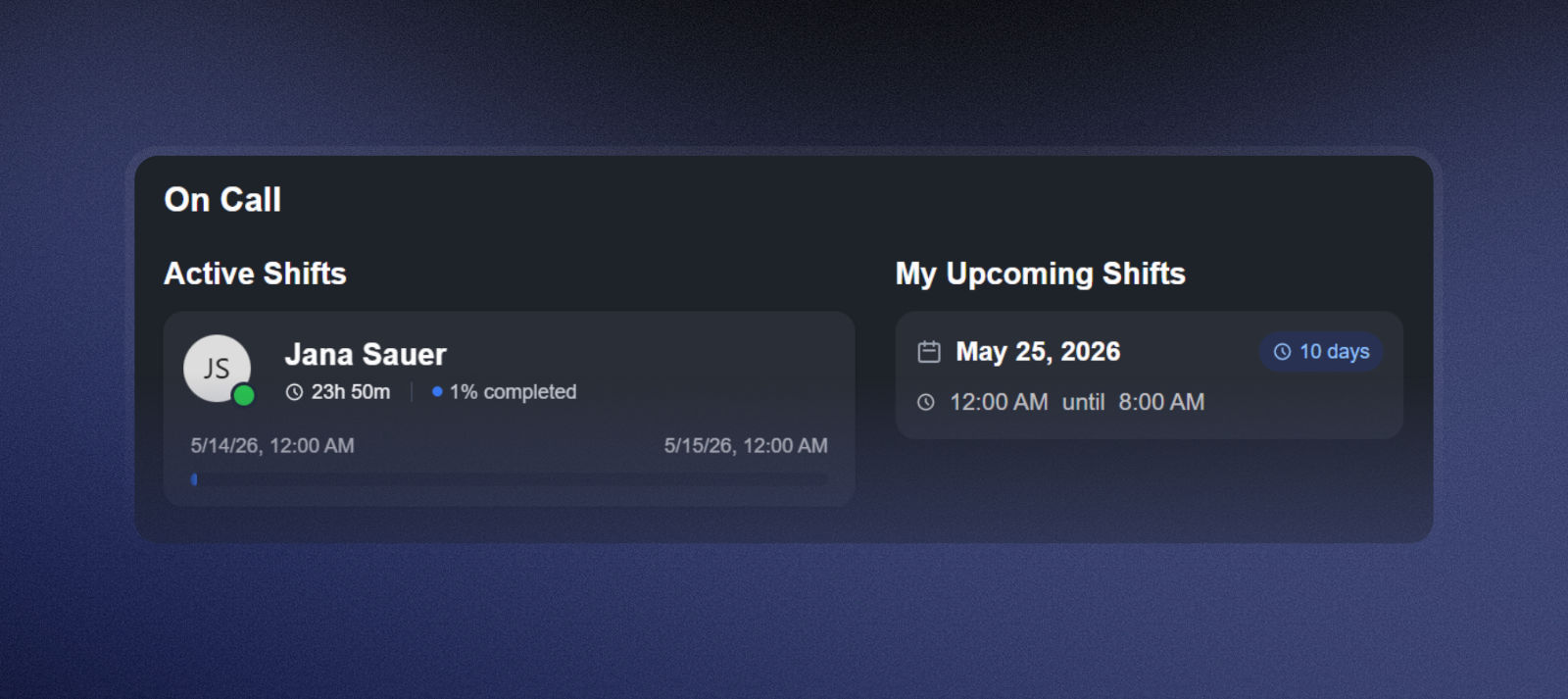
Pick a shared calendar, a Slack status, or a dashboard in your incident management tool and make it the authoritative source. This is what the overview looks like in Incidite:
Common Mistakes That Break On-Call Schedules
Alert fatigue kills faster than any rotation model
Audit your alerts regularly and remove or reclassify anything that doesn't require human action. Getting paged 30 times a week with low-signal, non-actionable alerts will burn anyone out regardless of how fair the schedule looks.
Mixing on-call duties with heavy development work
Keep on-call obligations separate from deep project work. When the on-call engineer is also expected to ship features during their shift, neither job gets done well. Reserve at least 50% of their time for reliability work and on-call response.
Minimum viable team size
With two engineers on rotation, each person is on-call every other week indefinitely. That's not a rotation — it's a slow grind. You need at least three people for a weekly rotation to feel sustainable. Five or more is where it starts to become genuinely manageable.
No runbooks
The on-call engineer getting paged at 2 AM shouldn't be starting from scratch. Write runbooks for your most common incident types. Runbooks dramatically reduce resolution time and lower the fear that makes on-call shifts feel worse than they are.
Tooling: What Your On-Call Setup Actually Needs
A proper on-call schedule requires more than a shared calendar. The minimum viable tooling stack:
On-call scheduling with rotation logic: automatic rotation through the team, not manual updates every week
Alert routing tied to the schedule: when an alert fires, it goes to whoever is on-call at that moment, automatically
Escalation policies: defined paths from primary to secondary to leadership, with time-based auto-escalation
Override management: the ability to swap shifts without breaking alert routing
Coverage management and gap detection: warnings when a time slot has no one assigned
FAQ On-Call Schedule
How many people do you need for a sustainable on-call rotation?
At least three to four for a weekly rotation to feel manageable. With two engineers, each person is on-call every other week indefinitely. For follow-the-sun coverage, plan for five to six engineers per time zone region.
How long should on-call shifts be?
Weekly is the most common for small teams. Google's SRE data shows shifts longer than 12 hours increase error rates and fatigue significantly. For high-alert-volume teams, 8–12 hour shifts are better even if they create more handoff overhead.
Should developers be on-call for their own services?
Yes, increasingly so. The DevOps principle of "you build it, you run it" means the person who knows the code best is also the most effective first responder when it breaks. The added benefit: developers with on-call experience tend to write more resilient, observable code.
How do you prevent on-call burnout?
Alert hygiene first: reduce noise so pages are actionable. Set explicit pager budgets. If your team exceeds two to three incidents per shift consistently, pause feature work and fix root causes. Compensate people fairly for on-call time and use runbooks so on-call engineers aren't solving the same problem from scratch every week.
What's the difference between an on-call schedule and an escalation policy?
The schedule defines who is on-call at a given time. The escalation policy defines what happens when they don't respond, how long the system waits before alerting a secondary, and who that secondary is. Both are necessary and neither is sufficient on its own.
Thanks for reading!
Got a suggestion or need help? Let us know